FightKaro Controls (Keyboard and Mobile)
Move with A/D or the arrow keys, jump with W or Up, crouch with S or Down, and hold back to block. Punch is J, kick is K, grab is I or J+K, super is L or Space. Pause is Esc, music is M, mute is N.
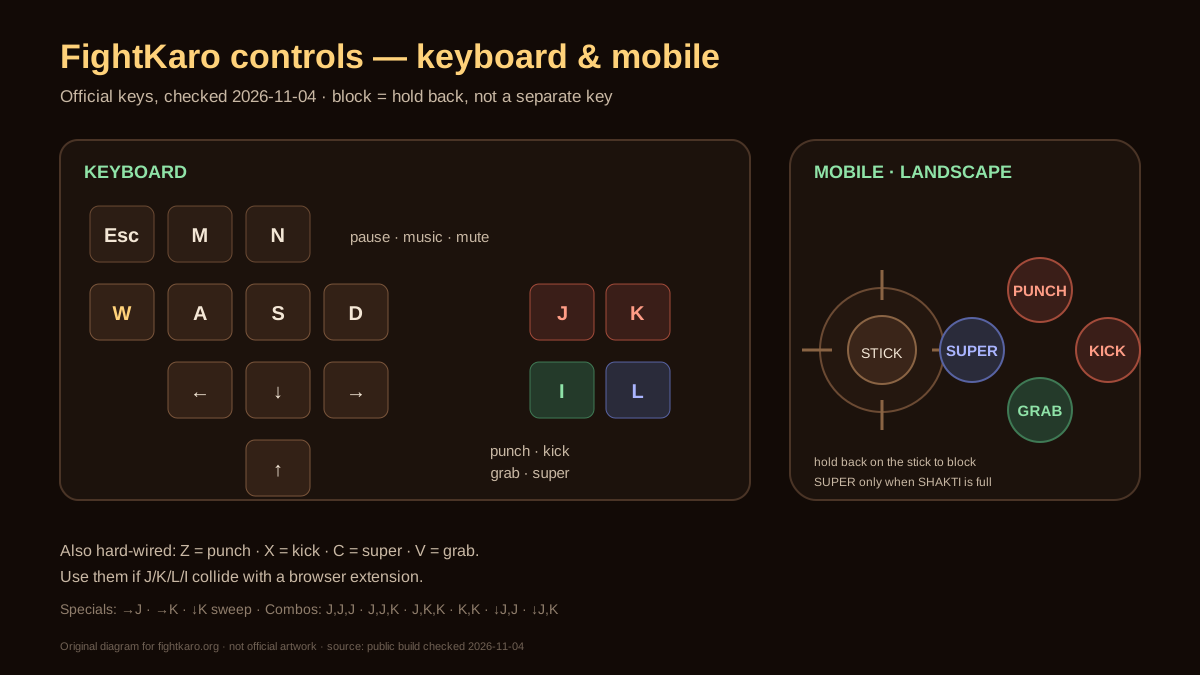
| Action | Keyboard | Alias | Phone |
|---|---|---|---|
| Move | A/D or ←/→ | — | Stick left/right |
| Jump | W or ↑ | — | Stick up |
| Crouch | S or ↓ | — | Stick down |
| Block | Hold back | — | Hold the stick back |
| Punch | J | Z | PUNCH |
| Kick | K | X | KICK |
| Grab | I or J+K | V | GRAB |
| Super | L or Space | C | SUPER |
| Pause | Esc | — | Pause button |
| Music | M | — | — |
| Mute | N | — | — |
PC and browser
- The desktop build does not force fullscreen. Use the browser fullscreen control if you want the canvas larger.
- If a room-code box is focused, J/K/L type into that box. Click the canvas before you fight.
- J, K, L, and I can clash with a browser extension. The public build also accepts Z punch, X kick, C super, and V grab.
- Esc both pauses the match and leaves browser fullscreen. If the first press only exits fullscreen, press Esc again or use the pause control.
Phone, landscape only
A portrait phone shows a rotate prompt. In landscape you get a stick on one side and PUNCH, KICK, GRAB, SUPER on the other. Stick up jumps, stick down crouches, and holding the stick backward blocks. Specials on the phone prompt read as forward-punch, forward-kick, and down-kick sweep.
Block is the back direction
There is no separate block key. Hold the direction away from your opponent. That is the line people miss when they search “what are the controls for fight karo.com”. The same hold-back rule is on the phone stick.
SHAKTI meter
SHAKTI runs from 0 to 100. A super fires only when the meter is full. On a normal fighter the super is listed as 30% damage; MBAPU’s super is listed as 40%. Hits, getting hit, and blocks all add meter. The pause screen is labeled CHAI BREAK.
Listed strings
The character-select footer lists J,J,J · J,J,K · J,K,K · K,K · ↓J,J · ↓J,K, plus specials →J, →K, and ↓K sweep. Frame numbers and what each string’s last hit is called are on the combos page. Boss spacing that uses the block key is on how to beat MBAPU.
Questions
What are the controls for fight karo.com?
Move A/D or arrows, jump W or Up, crouch S or Down, hold back to block. Punch J, kick K, grab I or J+K, super L or Space, pause Esc, music M, mute N.
How do you block in FightKaro?
Hold the back direction. Block is not its own button on keyboard or on the phone stick.
Is there a kick button on mobile?
Yes. Landscape mode shows PUNCH, KICK, GRAB, and SUPER beside the stick.
Sources
- FightKaro character-select footer — the 11 printed actions, Official build
- Public game build, key aliases — Z/X/C/V aliases, same build, not a second publisher
- Hindi key list — same keys, Devanagari labels
Checked 2026-11-04.